Notch apps decorate.
Transom decides who gets through.

Focus can decide who's allowed to interrupt you. Transom decides where you'll actually see them. Pinned to the notch, inches from your work, staying put until you deal with it. Texts and emails from your people, login codes, and real emergencies stop getting buried.

Launching soon. No spam, one email when it ships.
7-day free trial · $19 once, no subscription · macOS 14 or later
A VIP text pinned in the notch Replying from the notch AI-suggested replies in the notch Now playing, calendar and file shelf in the notch Transom preferences window The notch resting quietly
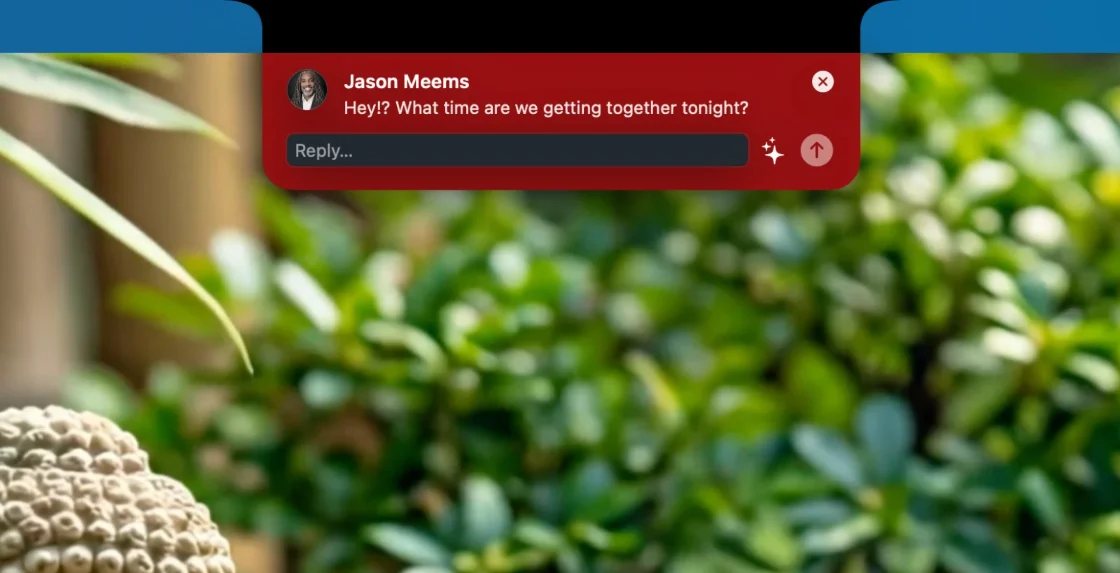
VIP texts pin until you deal with them
Your people show up right in the notch.

Every app on your Mac thinks it deserves your attention. Almost none of them do. The few who genuinely do reach you in two places, your texts and your inbox, and both get buried in the same stack you've trained yourself to ignore. Transom pulls those out and puts them where you can't miss them.

transom

Your notch, tuned to the people who matter.

Launching soon. No spam, one email when it ships.

VIP texts, impossible to miss.

When one of your people texts, the card pins to your notch and stays there until you act on it. No 5-second banner you miss while you're heads-down. Reply right from the notch, without switching apps. (You pick who counts; everyone else stays quiet in Messages.)

VIP email, pinned when it lands.

The moment a VIP sender emails you, a card pins to your notch, one click from the message in Gmail, and it holds there until you've seen it. The other two hundred emails wait for your next inbox sweep, exactly where they belong.

Login codes, handled.

The second a verification code arrives, it's waiting in your notch as a one-tap copy. You stop digging through Messages or your email to squint at six digits, and you stop depending on flaky autofill. Paste and you're in.

Focus that actually focuses.

Flip one switch and the noise goes quiet. Your VIPs, codes, and real emergencies still land in the notch where you'll see them, not in a silenced pile you'll never open. Come back, and a single card recaps exactly what was held while you were heads-down.

!

Emergencies break through, even from a number you never saved.

A text that says "call me" or "emergency" gets through, even from a number that isn't in your contacts. The babysitter on an unknown phone gets in. Marketing "urgent!" never does. (Apple's Emergency Bypass only works for contacts you've already saved. Transom doesn't need that.)

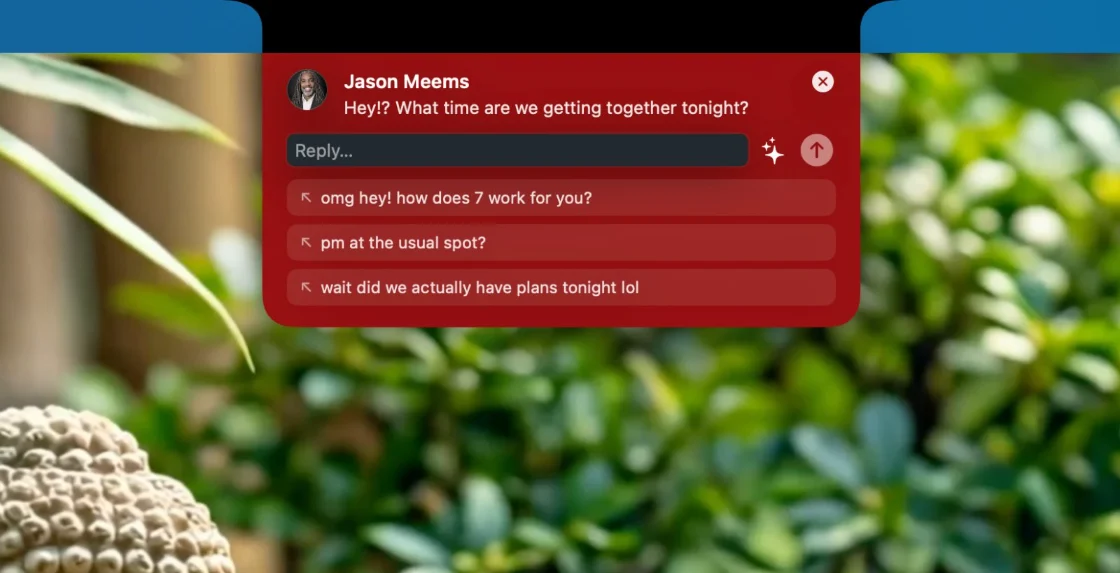
Reply right from the notch.

Answer without leaving what you're doing. You don't switch apps and you don't lose your place. Optional AI-suggested replies use your own key, and nothing ever auto-sends.

›_

Post anything to your notch.

Everything above is Transom deciding what reaches you. This is you deciding. One line, from a Shortcut, a script, or any app on your Mac, puts a card in your notch with the same three powers your people get: it lands where you're already looking, it can stay pinned until you deal with it, and it can even carry a reply field that sends a real iMessage.

A build finishes. A deploy breaks. A render's done. Leave in 22 minutes or you'll miss pickup. If it matters, it goes in the notch instead of a banner you'll scroll past. Focus holds these quietly until you resurface, so a build alert never breaks your deep work. Not a coder? A Shortcut does it with no code at all.

open "transom://post?title=Deploy%20finished&symbol=checkmark.seal.fill"

No SDK, no account, no library to install. Anything that speaks HTTP can post through a local, token-secured API; anything that can open a link can use transom://. It's the one thing Apple's notch will never do: let you decide what belongs there. See the API docs →

Build passed Deploy failed · pinned Render ready Leave now · 22 min to pickup

And between the moments that count, the notch earns its keep.

·Recent Notifications window, because everyone dismisses the wrong card once.
·Two cards at once? The second queues with a +1 chip. Nothing is silently lost.
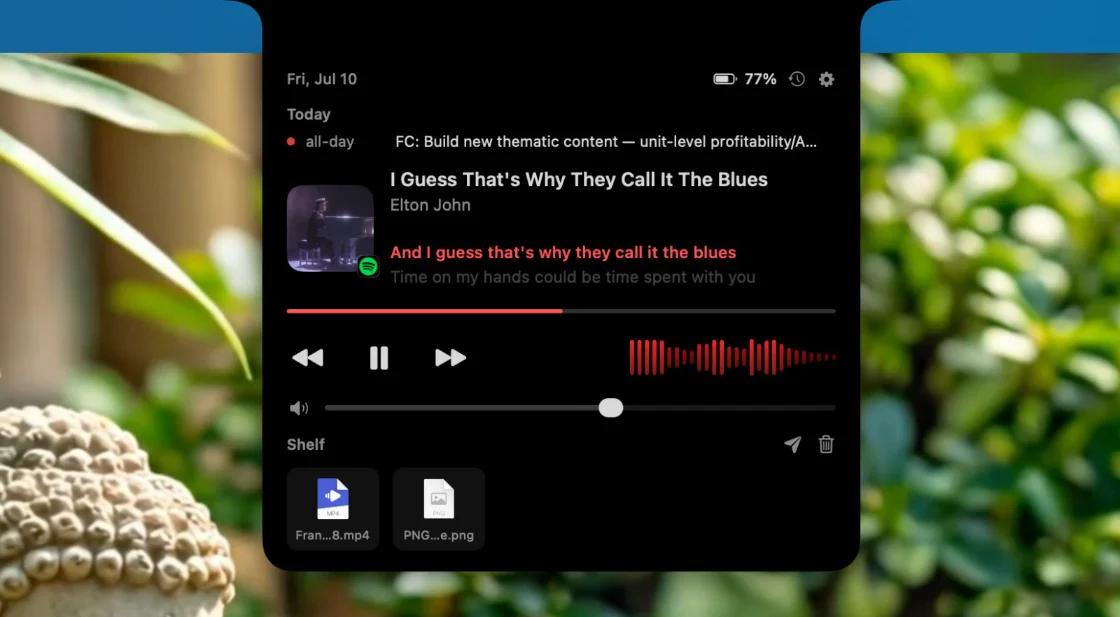
·Now playing with controls, seek, and live lyrics.
·An equalizer that moves to your actual audio, not a canned loop.
·A file shelf: drop files on the notch, AirDrop them later. It survives restarts.
·Battery, calendar, and volume at a glance.
·Every widget switches off. Strip it down to pure attention triage if you like.
·The notch stays small until you hover to ask for more.

How it works

1

Download and open.

Transom lives in your menu bar and your notch. No Dock clutter.

2

Grant access once.

A guided setup walks you through the macOS access Transom needs: one permission to start, plus a few optional extras. Two minutes, one time.

3

Pick your people.

Add your VIPs and go back to work. The notch stays quiet until it matters.

Boringly well behaved.

An app that lives in your notch all day has to be a good tenant. This one is.

Idles at roughly 0.0% CPU. Fully event-driven, no polling, no battery tax.
No Dock icon, no Cmd+Tab entry. It lives in the menu bar and the notch, nowhere else.
Never steals a click or your typing focus. Your cursor stays where you left it.
Your Gmail app password and AI key live in the macOS Keychain, never in a file.
Finds the notch on any display setup, docked, clamshell, or notchless.
The rules that decide what interrupts you are unit-tested. "911 Main St" will never fake an emergency.

Your messages never leave your Mac.

Transom reads your Messages database directly on your Mac, the same file Apple's own apps use. There is no Transom server, no account, no analytics, no cloud. Notification history is a small file on your Mac that you can clear anytime. If you connect your own AI key for reply suggestions, your text goes only to the provider you chose, and that feature is off until you turn it on. If you add email VIPs, your Gmail app password is stored in the macOS Keychain, never in a plain file.

That is the whole privacy policy, in plain sight.

Notch apps decorate. Transom decides.

A notch app
Transom
Music controls, shelf, calendar, battery
Yes
Yes
Knows WHO is texting you
No
Your VIPs pin until handled
Knows WHO is emailing you
No
VIP email with Mark Read / Archive
Catches login codes
No
One-tap copy
Lets an emergency pierce Focus from an unsaved number
No
"Call me" gets through. "911 Main St" does not
Remembers what you dismissed
No
Recent Notifications history
Free trial
48-72 hours is typical
7 full days

If you want a prettier music widget, several good notch apps cost less than Transom. If you want the people who matter to never get buried, there is one.

Why I built this

I wanted to be interrupted by the one person I never want to miss: my wife.

Her texts and emails got buried like everyone else's, in a wall of notifications I'd learned to ignore. So I built Transom to lift her name out of the noise and hold it right where I'd see it: the notch, a few inches from whatever I'm working on, until I actually deal with it.

Then I noticed how much else the notch could do, and built out the features I figured other people would want too. But that first one is still the reason it exists.

Wilton E. Blake, II
Built by Wilton E. Blake, II Founder, Transom

One price. Yours forever.

$19
one time
Free 7-day trial, no card required
Every feature included. No subscription, no upsells, no nagging.
Use it on up to 3 of your Macs
Free updates through 1.x

14-day money-back guarantee. If it's not for you, email us and it's done.

FAQ

Doesn't macOS Focus already do this?

Focus can silence the noise, and it's great at that. What it can't do is show you the one message that survived. Your VIP's text still lands in the same top-right stack you've trained yourself to swipe away, and it's gone in seconds. Transom puts that message in the notch, inches from your cursor, and keeps it there until you act. Filtering is half the job. Being impossible to miss is the other half.

Why isn't this on the Mac App Store?

App Store apps are sandboxed and can't read your Messages database, which is the heart of Transom. So Transom is signed and notarized by Apple, the same security checks the App Store runs; you just download it from this site. Same trust, more capable app.

What does Transom need access to?

Full Disk Access, so it can see your incoming messages, and optionally Calendar, system-audio metering for the equalizer, and Messages automation for sending replies. Email VIPs sign in with a Gmail app password stored in the macOS Keychain. The setup guide walks you through each one and shows live checkmarks as you go.

Does email work with my provider?

Gmail today, using an app password that lives in your macOS Keychain. VIP email cards open the message in Gmail with one click. More providers, and inline email reply, are on the roadmap.

Which Macs does it work on?

Any Mac on macOS 14 Sonoma or later. It shines on MacBooks with a notch; on other Macs the panel simply lives at the top center of the screen.

Do texts really stay on my Mac?

Yes. Transom reads the local Messages file Apple's own apps use, and there's no server, no account, and no analytics. (See the privacy section above.) The only thing that ever leaves your Mac is a reply you send, or, if you switch it on, text you hand to your own AI provider for a suggested reply.

Can it post my own alerts?

Yes. Any app, script, or Shortcut can put a card in your notch with one line, and there is a local HTTP API too. Transom is not only a VIP filter; it is a place to put anything that must not be missed.

What if it's not for me?

The 7-day trial is the honest answer to that. And if you buy and change your mind within 14 days, email us and we refund it, no forms, no friction.

Be first through the notch.

Transom is almost here. Leave your email and I'll let you know the day it ships.

Launching soon. No spam, one email when it ships.